
Berikut cara mudah untuk menghosting dan mengelola ads.txtfile Anda sendiri, tanpa perlu merepotkan teknisi Anda:
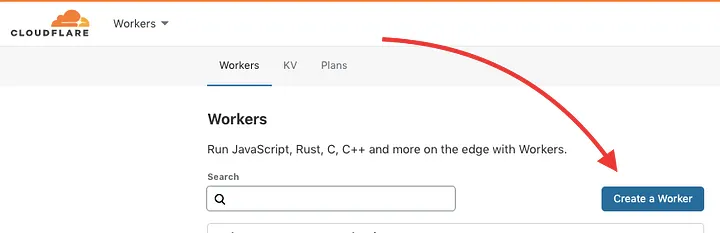
Siapkan Cloudflare jika Anda belum menggunakannya, dan buat worker:
 |
| medium / acoyfellow |
Customize this snippet with your ads.txt
Sesuaikan cuplikan ini dengan ads.txt( gunakan alat ini untuk membantu Anda menghasilkan format yang valid), lalu klik “Simpan & Sebarkan”. Anda dapat melihat pratinjaunya.
async function handleRequest(request) { const init = { headers: { 'content-type': 'text/plain', }, } return new Response(adstxt, init) } addEventListener('fetch', event => { return event.respondWith(handleRequest(event.request)) }) const adstxt = `# google.com, pub-7439281311086140, DIRECT, f08c47fec0942fa0 # banner, video, native rubiconproject.com, 11078, DIRECT, 0bfd66d529a55807 # banner, video c.amazon-adsystem.com, 3159, DIRECT # banner, video openx.com, 537153334, DIRECT # banner appnexus.com, 7745, DIRECT # banner, video kargo.com, 105, DIRECT # banner `;
Contoh Skrip Pekerja untuk Menyajikan Ads.txt
Atur Rute Anda
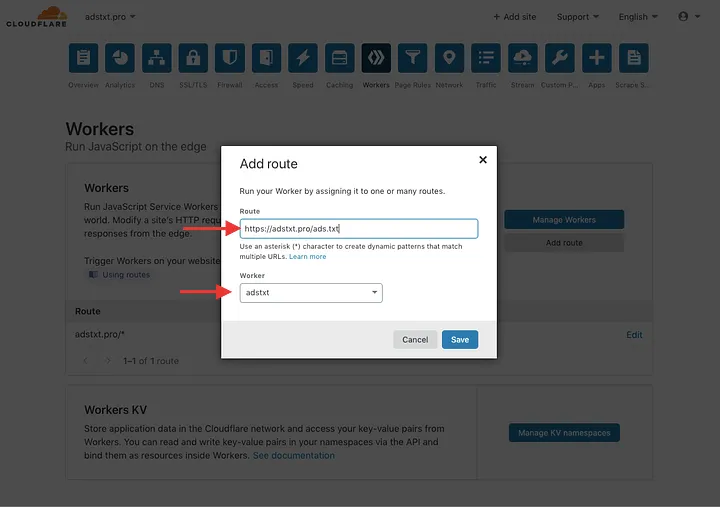
Buka domain Anda, dan buka tab “Workers”. Klik “Add Route”
- Atur rute Anda ke https://your.domain/ads.txt
- Pilih worker yang baru saja Anda buat di langkah 2
 |
| medium / acoyfellow |
Selesai! Nikmati ads.txt Anda yang super cepat dan mudah dikelola.